A large part of the wireless research we do in the lab comes down to a boring physical problem: the antenna that works at 433 MHz is not the antenna that works at 2.4 GHz, and the SDR on the bench has exactly one RF input. Every time an analysis moves from a sub-GHz industrial radio to a Wi-Fi or Bluetooth capture, someone has to disconnect one antenna and connect another. It sounds trivial, but over a long measurement campaign it wastes time, wears out connectors, invites mistakes and makes unattended or remote captures impossible.
The research cost is bigger than the cable work suggests. Much of our wireless protocol work starts with a scan: sweep the RF spectrum to find where a device transmits, then capture and analyse it. With one antenna per band, the sweep stops at the antenna connector, because no script can unscrew one. The multiplexer makes the antenna part of the automated path. A measurement harness can step the switch through all eight ports and scan the full RF spectrum unattended, from sub-GHz industrial bands to 2.4 GHz Wi-Fi and beyond. And because the board exposes a web interface on the network, the scan does not have to be driven from the bench. A researcher working remotely can change antennas from a browser while the setup sits in the lab's shielded enclosure.
The obvious fix is an antenna switch, and off-the-shelf options exist. The best known in the SDR world is Opera Cake, the antenna switching add-on for the HackRF, which is controlled by the host through the HackRF's own expansion header and tooling. It is a solid design, but it ties the switch to one specific SDR card. Lab-grade RF switch boxes solve the problem, but at lab-grade prices; most cheaper alternatives are either manual or USB-only.
We wanted something else: a switch that is independent of which SDR is connected, that can be operated by hand at the bench without a computer, and that can also be driven over the network when the setup is sitting in a shielded box or in another room. Since we could not find an available product that covered all three requirements, we designed our own. This post walks through the result, the choices behind it and the details that turned out to matter.
Design Goals
We wrote down five requirements before opening the EDA tool:
- SDR-agnostic. The board sees only 50 Ω coax on both sides, with no expansion header or host tooling to tie it to one receiver. Anything with an SMA antenna connector can use it.
- Broadband. One usable path across the whole span, with no per-channel filtering that would lock a port to a band. The same channel that passes a 433 MHz industrial signal also passes a 2.4 GHz Wi-Fi or Bluetooth capture, so moving between them no longer means swapping antennas
- Multiple ways to control it. Physical buttons for bench work with no computer attached, and a web interface for the switch inside a shielded enclosure, a rack, or another room. The web side also makes the board scriptable from a measurement harness.
- Self-powered and self-hosted. USB-C for power, no drivers, no host software, no vendor cloud. The web application runs on the board itself, with no login and no third-party service in the switching path.
- Manufacturable in small quantities. A standard 4-layer FR4 stackup, parts that live in the assembly service's own component catalogue, and only the genuinely critical components left for hand assembly. That keeps a small batch affordable and a revision quick to order.
RF Board Architecture
The board is built around two active devices.
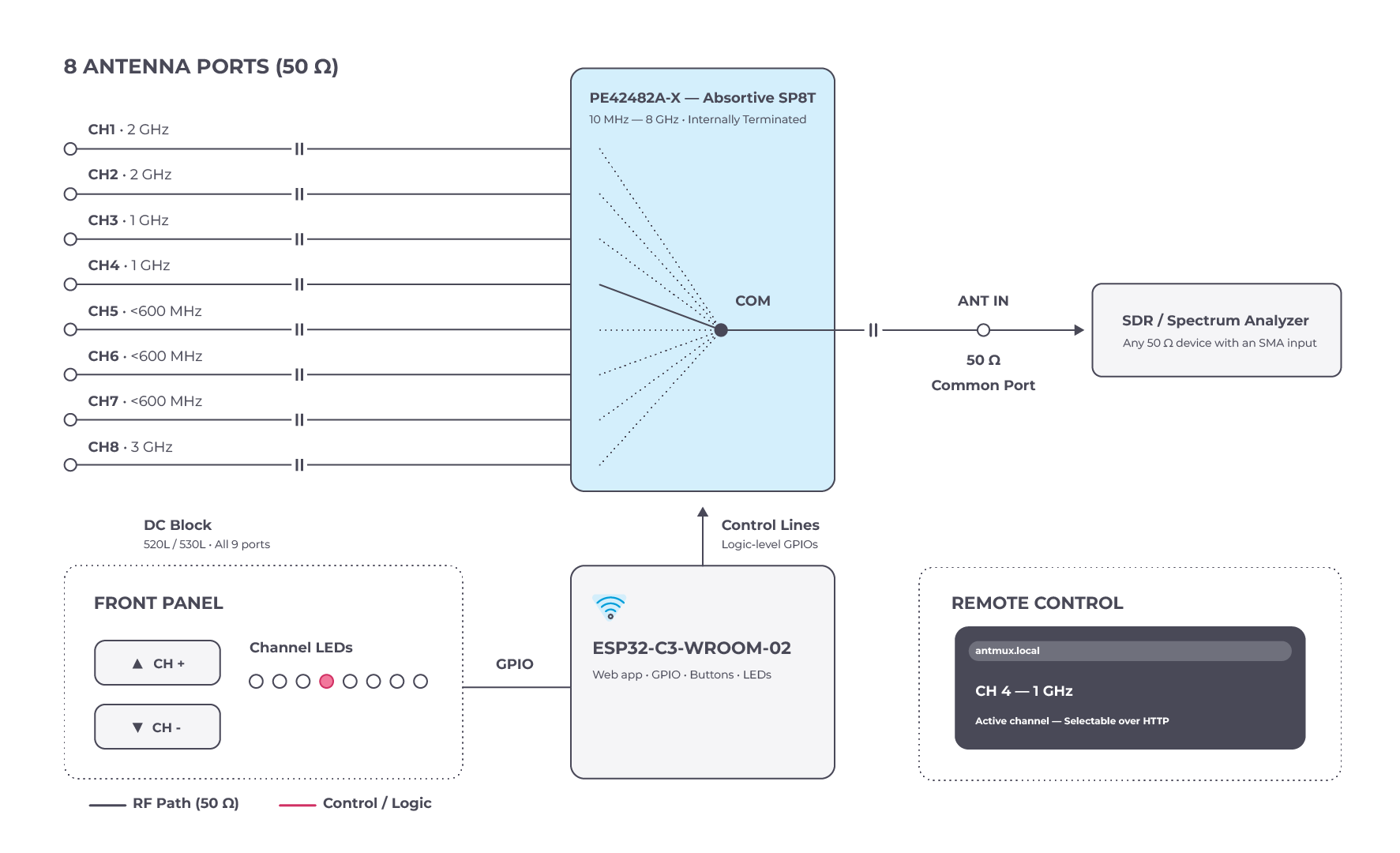
The RF core is a pSemi PE42482A-X, an absorptive SP8T (single-pole, eight-throw) RF switch in a 24-lead 4 × 4 mm QFN. The datasheet specifies 10 MHz to 8 GHz, roughly 1.1 dB insertion loss and 41 dB isolation at 6 GHz, 227 ns switching time and 33 dBm CW power handling. Two properties made it particularly well suited to this kind of lab tool. First, it is absorptive: the unselected ports and the all-off state are internally terminated, so an unselected port is not left open, reducing the reflections it could otherwise introduce at the common port. Second, it is controlled by plain logic levels, which means the switch can be controlled directly from a few GPIOs rather than through a proprietary interface.
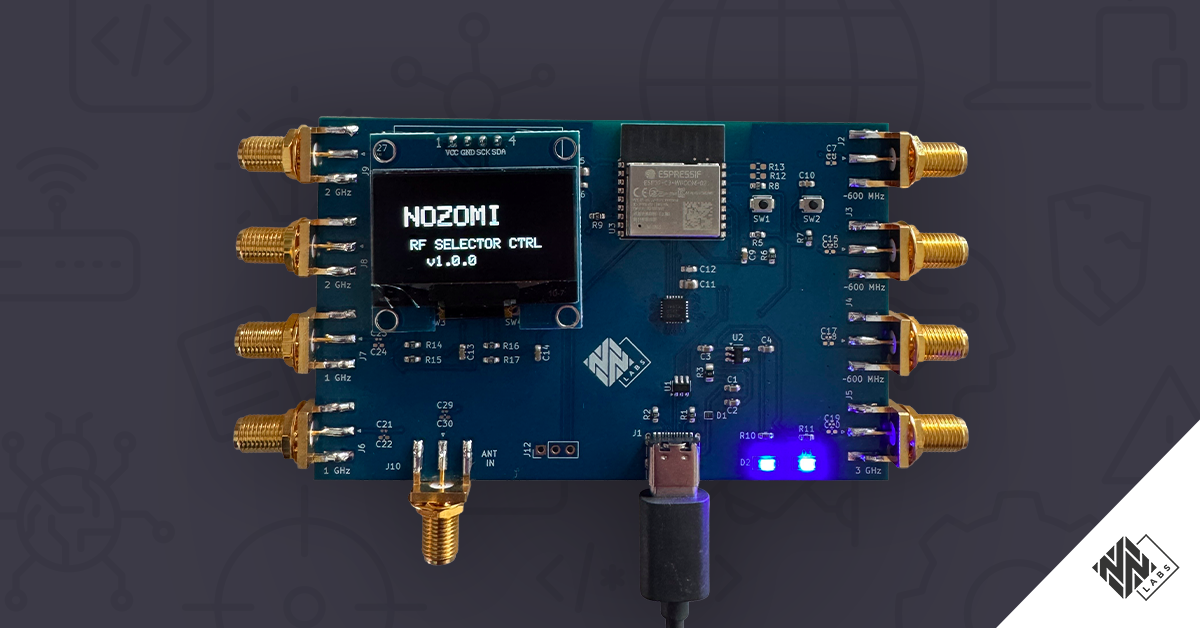
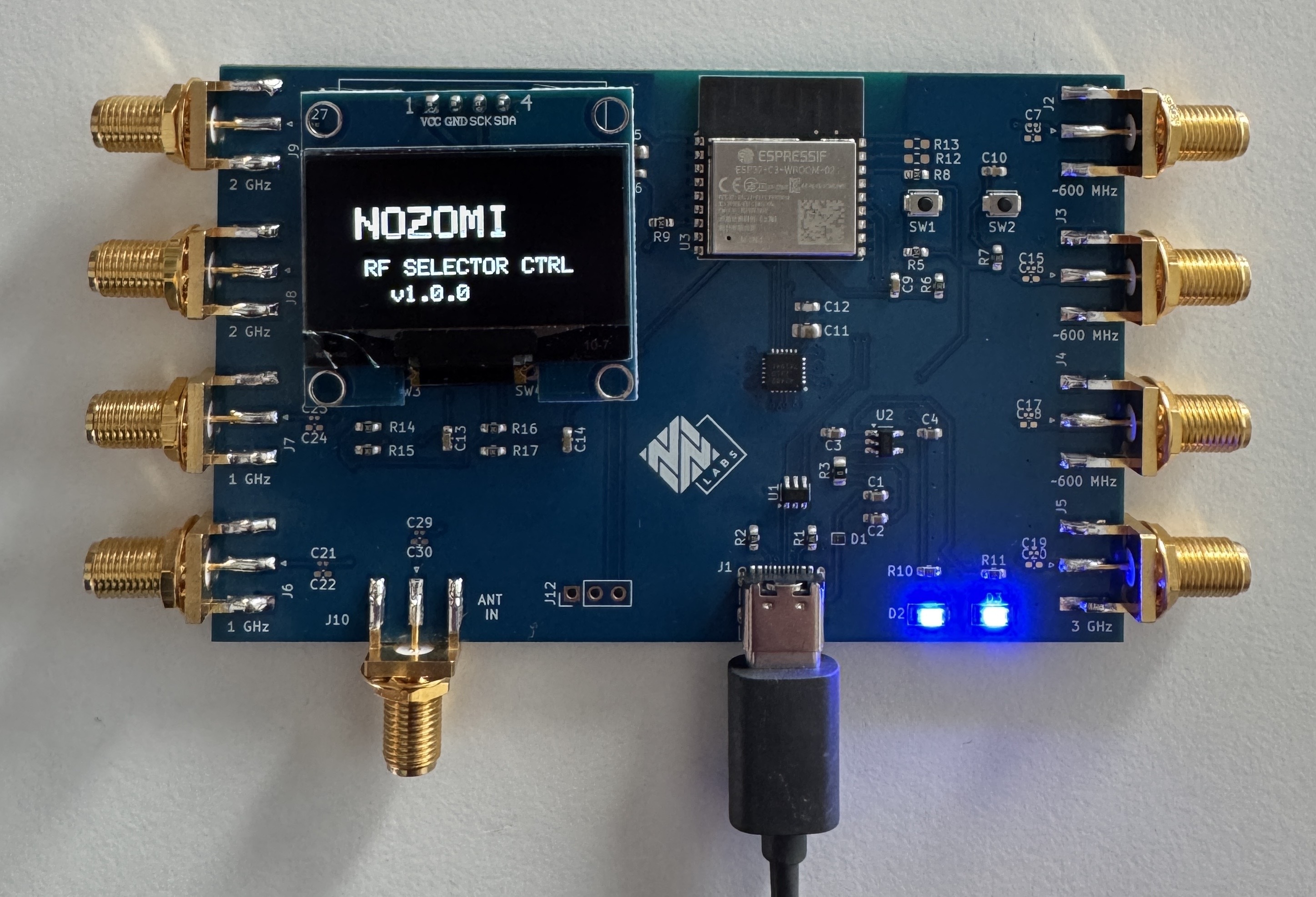
The control side is an ESP32-C3-WROOM-02. It drives the switch's control pins, reads the two front-panel buttons, drives the status LEDs, displays status information and menus on an OLED display, and hosts the web application. The module sits at the top edge of the board with a copper keep-out under its integrated antenna on all four layers, to avoid placing ground copper directly beneath the module's integrated 2.4 GHz antenna.
Everything else is support: a USB-C receptacle with the usual 5.1 kΩ CC pull-downs, a USBLC6-2SC6 for ESD protection on the data pair, an AP2112K-3.3 LDO for the 3.3 V rail, and local decoupling at the switch and the module.
The RF Path
Nine SMA edge-mount connectors sit on three edges of the board: four antenna ports on each short edge, and the common port, silkscreened ANT IN, on the long edge where the SDR cable comes in.
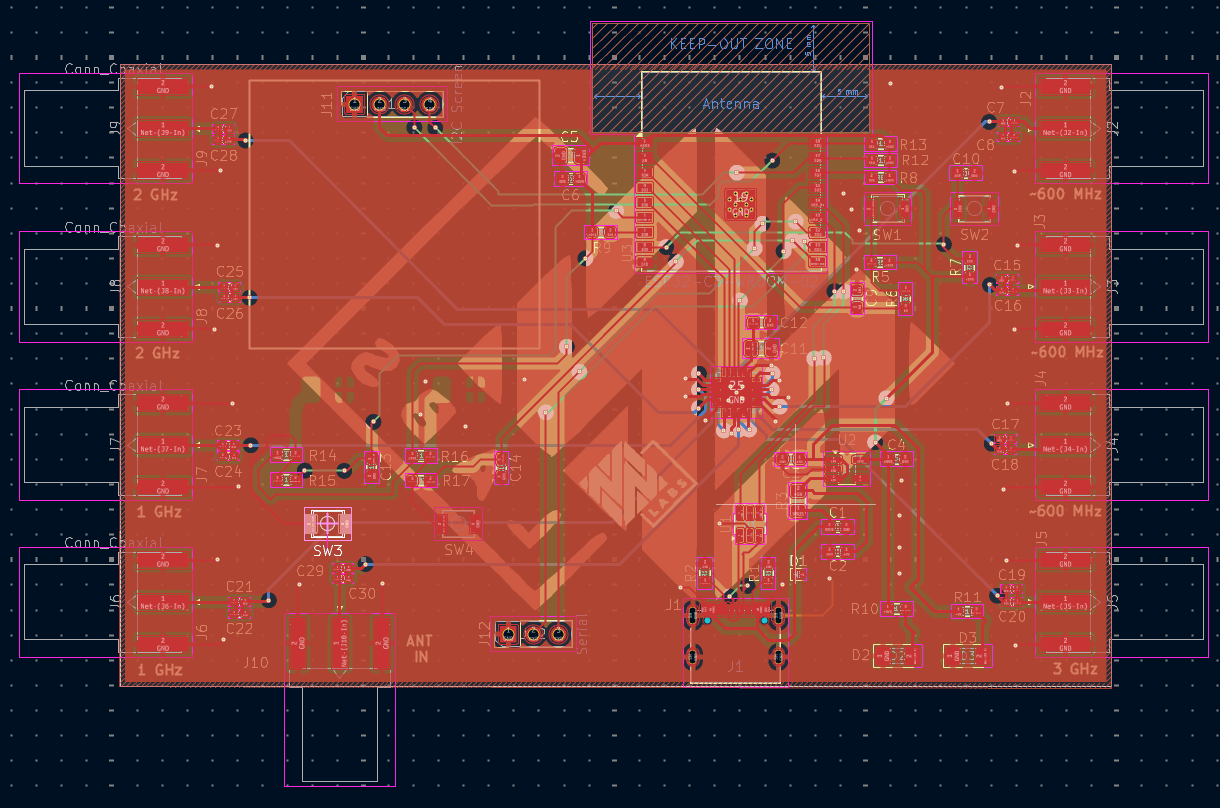
From each connector the signal runs a short distance on the top layer, passes through a series DC-blocking capacitor, then drops through a via to the bottom layer. The eight antenna lines and the common line fan out on the bottom layer as 0.25 mm-wide microstrip traces, sitting 0.1 mm above the inner ground plane, and return to the top layer through vias at the switch itself. Keeping the RF on the bottom layer, referenced to a solid ground plane only 0.1 mm away, left most of the top layer available for the digital section (ESP32, the LDO and the USB front end) while maintaining a continuous return path directly beneath the RF traces.
The switch is grounded through twelve vias in its thermal paddle, and 96 stitching vias tie the top-layer ground pour to the inner plane across the board, concentrated around the via transitions where the RF changes layers.
Why Every Port Gets a Capacitor
The PE42482 does not need DC blocking caps if there is no DC on the RF ports. In a lab, that assumption does not hold. Active antennas and LNAs are fed through bias tees, some SDRs put a bias voltage on their input, and a board that spends its life being cabled up to whatever is on the bench today will eventually meet a DC-carrying port. Accidentally shorting a bias supply is a bad way to discover that assumption was wrong.
So, every one of the nine ports gets a series capacitor. The interesting part is which capacitor. A conventional MLCC has a self-resonant frequency beyond which its impedance becomes increasingly inductive, potentially well below the top of our intended operating range, which could quietly compromise the broadband response of every channel. We use Kyocera AVX (formerly ATC) 520L and 530L broadband capacitors instead: 0402 X7R parts specified for flat, low insertion loss across a very wide range, 160 kHz to 16 GHz for the 520L and 16 kHz to 18 GHz for the 530L. With those in place, the coupling capacitor is not expected to be the dominant bandwidth limitation; the switch and PCB implementation become the main constraints. The design targets the same 10 MHz to 6 GHz operating span on every port, although the complete RF path has not yet been experimentally verified across that range.
These are the only parts we place by hand, so they are deliberately absent from the assembly BOM. Each port has two alternative footprints side by side, a hand-solder 0402 and a tighter 0201, so we can populate whichever case size we have in the drawer without redoing the layout.
One consequence worth spelling out: the frequency labels on the silkscreen (two ports for around 2 GHz, two for around 1 GHz, three for the sub-GHz bands and one for 3 GHz) are a convention, not a constraint. They document how our own antenna set is normally cabled up so that nobody has to guess at the bench. No port is intentionally restricted to a specific band; each is designed to cover the full target operating range.
Control: Buttons, Serial Interface and WebApp
The board exposes four control paths that can remain available at the same time: local buttons, USB CDC, TTL UART, and the web interface. A channel change made through one interface is reflected in the others.
The two front-panel keys are the fast path, wired with pull-ups and RC debounce. NEXT cycles through the options on the OLED display and ENTER confirms the highlighted action — select a channel, enable or disable Wi-Fi. No host, no login, nothing to configure. When the other hand is holding a probe, this is the interface that gets used.
For bench setups, the ESP32-C3's native USB CDC and a separate TTL UART both expose the same plain-text command line: select a channel, force the switch to its all-off (absorptive) state, enable or disable Wi-Fi, or edit the Wi-Fi credentials — a dozen short commands, documented with a help prompt. This is also the fallback path any time Wi-Fi is deliberately disabled.
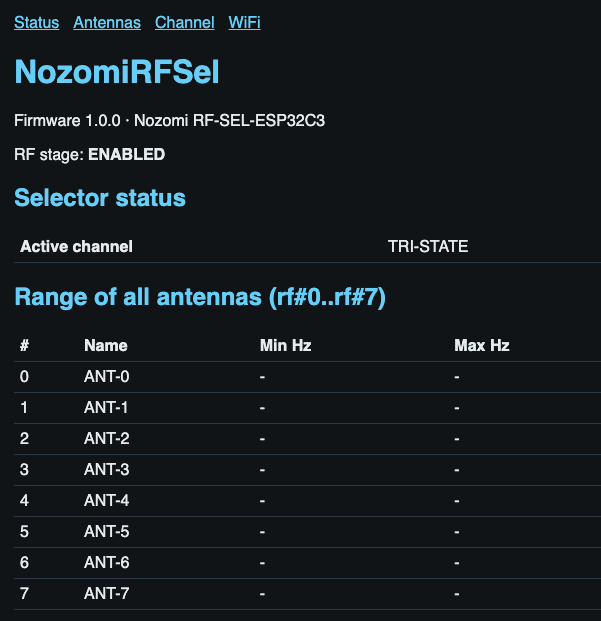
With Wi-Fi enabled, the microcontroller also hosts a small web application: a status page with the active channel and the known range of every antenna, a configuration page for each of the eight ranges, and a channel-selection page that suggests which port to use for a given frequency, entered in Hz, MHz or GHz. If no SSID has been provisioned yet, the module falls back to its own access point for initial setup rather than requiring a serial connection.
The property that matters most in practice, though, is that Wi-Fi is independent of the switch state. Wi-Fi remains enabled by default so the board is always reachable, but it can be switched off — from the menu or over the wired CLI — without affecting which antenna is selected. That distinction exists for one reason: when capturing in the 2.4 GHz band, the ESP32-C3's own Wi-Fi transmissions can be picked up by the SDR and interfere with the measurement. Disabling Wi-Fi removes that local source of RF activity without affecting the selected antenna. The setting persists across a power cycle, so a board configured for a quiet capture stays quiet after a reset, until Wi-Fi is explicitly re-enabled.
Because the web application is unauthenticated, anyone with access to the same Wi-Fi network can change the active channel or disable Wi-Fi. It is therefore worth being explicit about the threat model: this is a lab instrument with no authentication mechanism of its own. Our board at Nozomi Networks runs on an isolated lab SSID, and we would not put it on a shared network. Adding an unauthenticated control surface to a network is, after all, exactly the kind of design pattern we spend much of our time finding in other people's products.
The Board
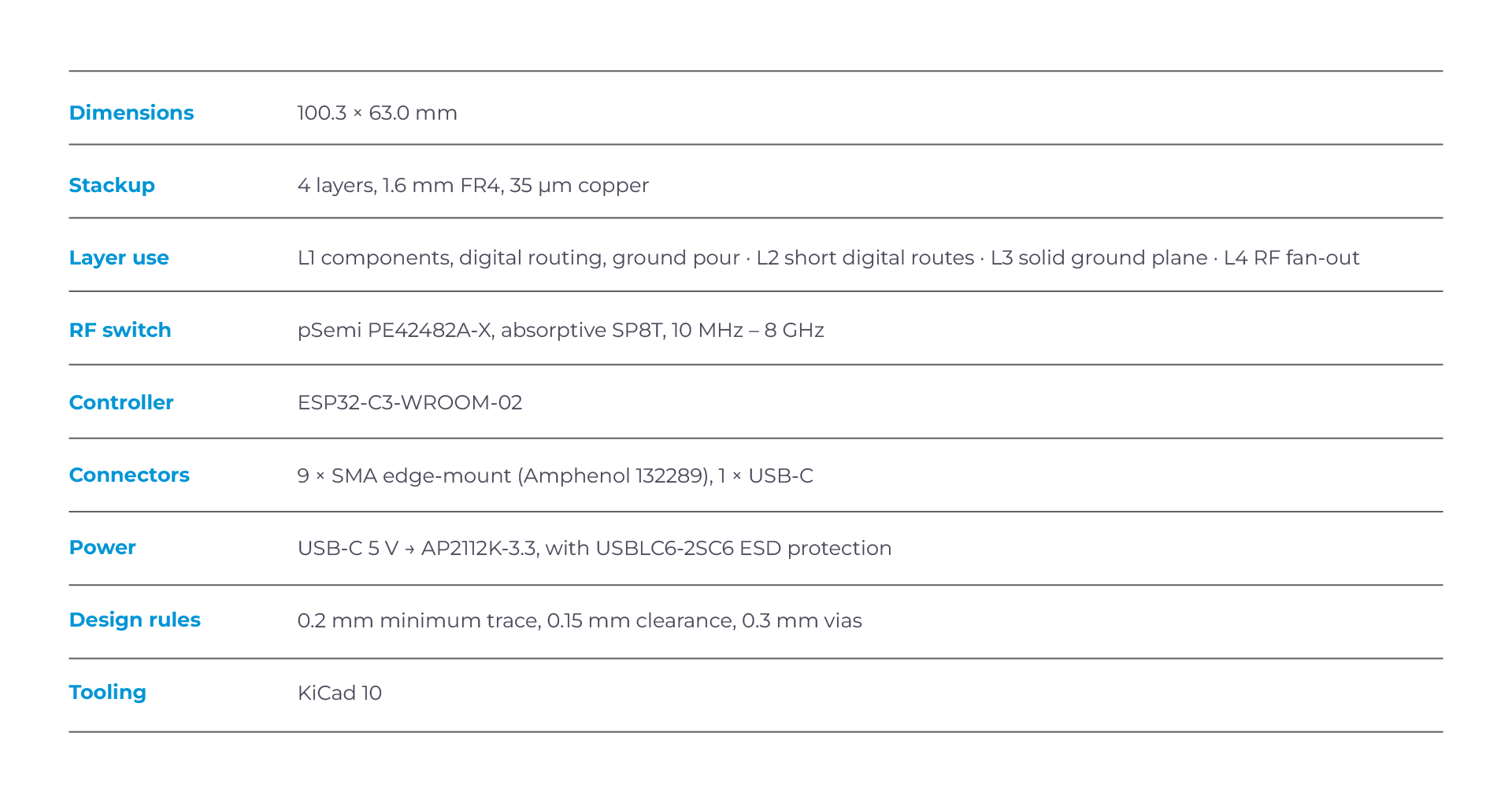
The 0.1 mm outer-layer prepreg was the stackup decision that shaped most of the RF layout. It is what makes a 0.25 mm RF line practical on FR4, and it is worth confirming the impedance against the fab's actual stackup rather than relying on nominal material parameters, because at 6 GHz variations between nominal and actual dielectric properties can translate into a meaningful impedance error.
What We Would Change
A few changes were already on our list for a revision B before the first boards came back:
- Test points on the control lines. Debugging a switch state with a scope on a QFN pin is avoidable.
- A reference through-path. A dedicated reference path from ANT IN to an additional connector, with no switch in between, would give us a de-embedding reference for characterising the board's own insertion loss.
- Mechanical mounting. SMA connectors and coaxial cables put significant mechanical load on the PCB, which currently has no dedicated mounting points.
Why We Are Sharing This
Nozomi Networks Labs spends a lot of time looking at wireless protocols in OT and IoT environments, and the quality of that work depends on the quality of the bench. Sometimes the missing piece is not another instrument but a fixture, and building one is faster than adapting a product designed for someone else's workflow. This board took one PCB revision, a handful of catalogue parts, and a weekend of firmware work, and it removed a recurring source of friction from our RF measurements. The PCB design files and ESP32 firmware are available in our public GitHub repository.
If you build something similar, the two decisions we would repeat are the absorptive switch and the broadband coupling capacitors. They add relatively little complexity and support the goal of making all eight switched ports broadband and functionally equivalent. At the time of writing, however, we have not yet completed RF characterization of the assembled board, so the 10 MHz to 6 GHz operating range described here remains a design target rather than a measured end-to-end specification. Insertion loss, return loss, port-to-port isolation and channel-to-channel variation still need to be measured before we can quantify the RF performance of the complete multiplexer.
.webp)