This article is about how Nozomi Networks Labs got from an encrypted firmware image to a 0-click RCE chain.
We conducted our research on an IoT device that supports third-party applications. Both the firmware and the applications were encrypted, and the vendor's website only exposed the latest releases, with no useful version history. We started by looking beyond the current download page.
To make progress, we needed to search the vendor's entire public surface for traces of legacy firmware images. We turned the reusable parts of that process into the Firmware Archaeology Toolset (FAT), which we presented at our DEF CON 2026 IoT Village talk and workshop, Raiders of the Lost Firmware. FAT brings together several public-surface discovery techniques into a repeatable workflow, where firmware retrieval is the core objective.
This workflow led us from publicly available resources to the vendor logic needed to process and decrypt the latest firmware image. Once that workflow was explicit, we could also teach it to an LLM agent. We wrote dedicated skills to automate the process, making FAT suitable for LLM agent pipelines.
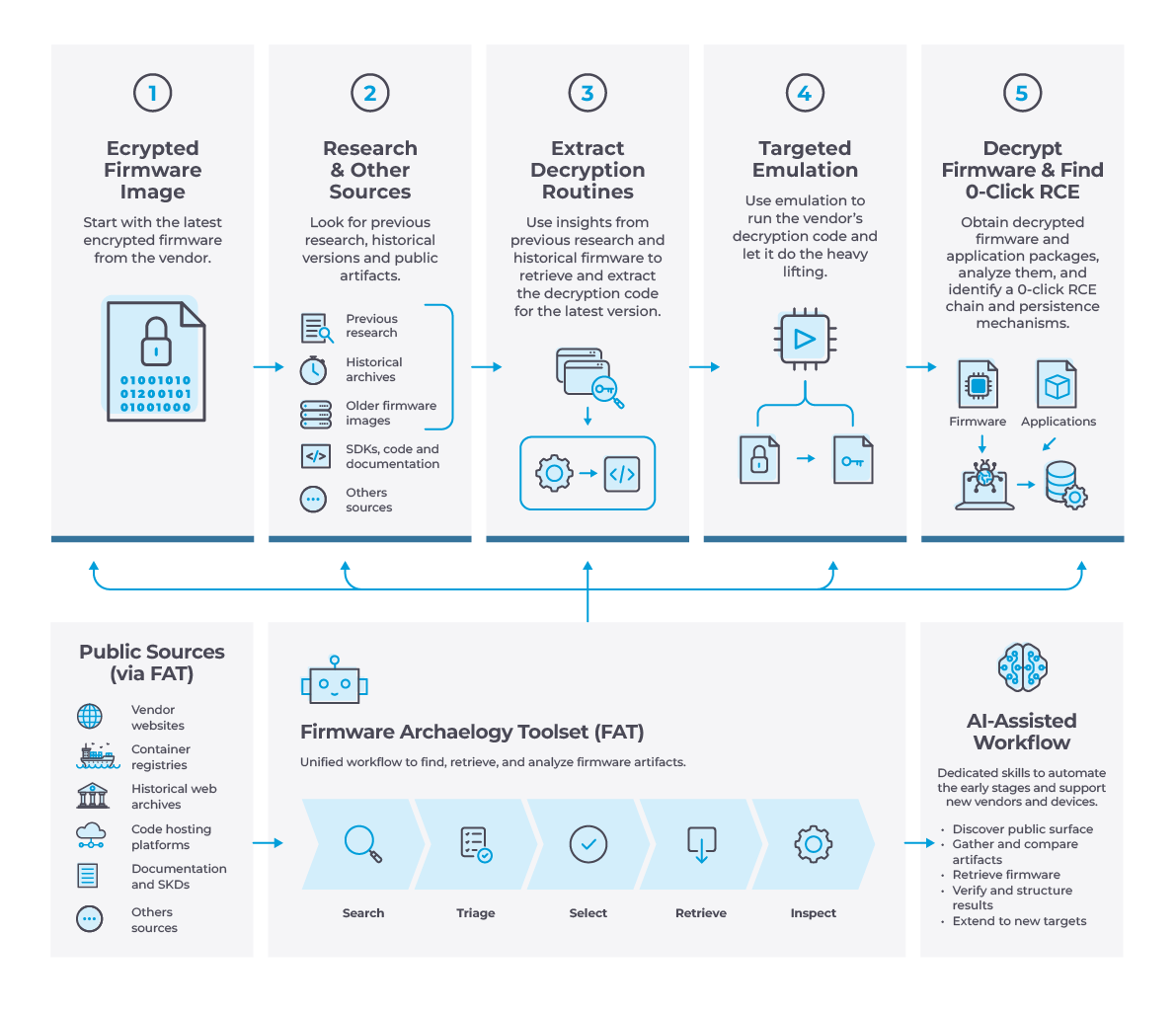
When the Firmware Is Locked: the Idea Behind FAT
When working on an IoT or OT device, it is common to hit an uncomfortable point very quickly: the firmware is encrypted, there is no shell, and the vendor documentation says little about the update format.
There are several possible reactions. We could move to another target. We could continue with black-box analysis and hope that the device eventually gives us an opening, as we described in a previous article. Or we could try to extract the firmware using an hardware approach. That last option works, but it requires the right access, tools, time and some tolerance for turning an expensive device into a very elaborate paperweight.
Rather than risk damaging the device to extract the image, we looked for material that explained how the vendor handles it. That took us to an old programming guide reporting the presence of a development container. We searched Docker Hub for this container. The broad search provided thousands of results, too many to inspect manually. That is where the idea of a tool supporting public surface enumeration and classification came from.
FAT is exactly that: a stateful command-line tool designed to move from public-surface discovery to artifact retrieval. FAT is not intended to replace broad OSINT frameworks. Tools such as SpiderFoot, Recon-ng, and sn0int have broader source coverage and richer investigation models. FAT is a specialized, plugin-based tool for firmware recovery.
Each project keeps track of the current research status and results in a structured way, so that evidence that might look irrelevant today can become useful when more context is added to the project. FAT currently brings together several kinds of public sources, including container registries, historical web archives and code-hosting platforms. A plugin provides the source-specific integration, while the surrounding workflow handles the repetitive steps.
A simplified surface-plugin flow looks like this:
And the workflow uses a command model which is common to all the plugins:
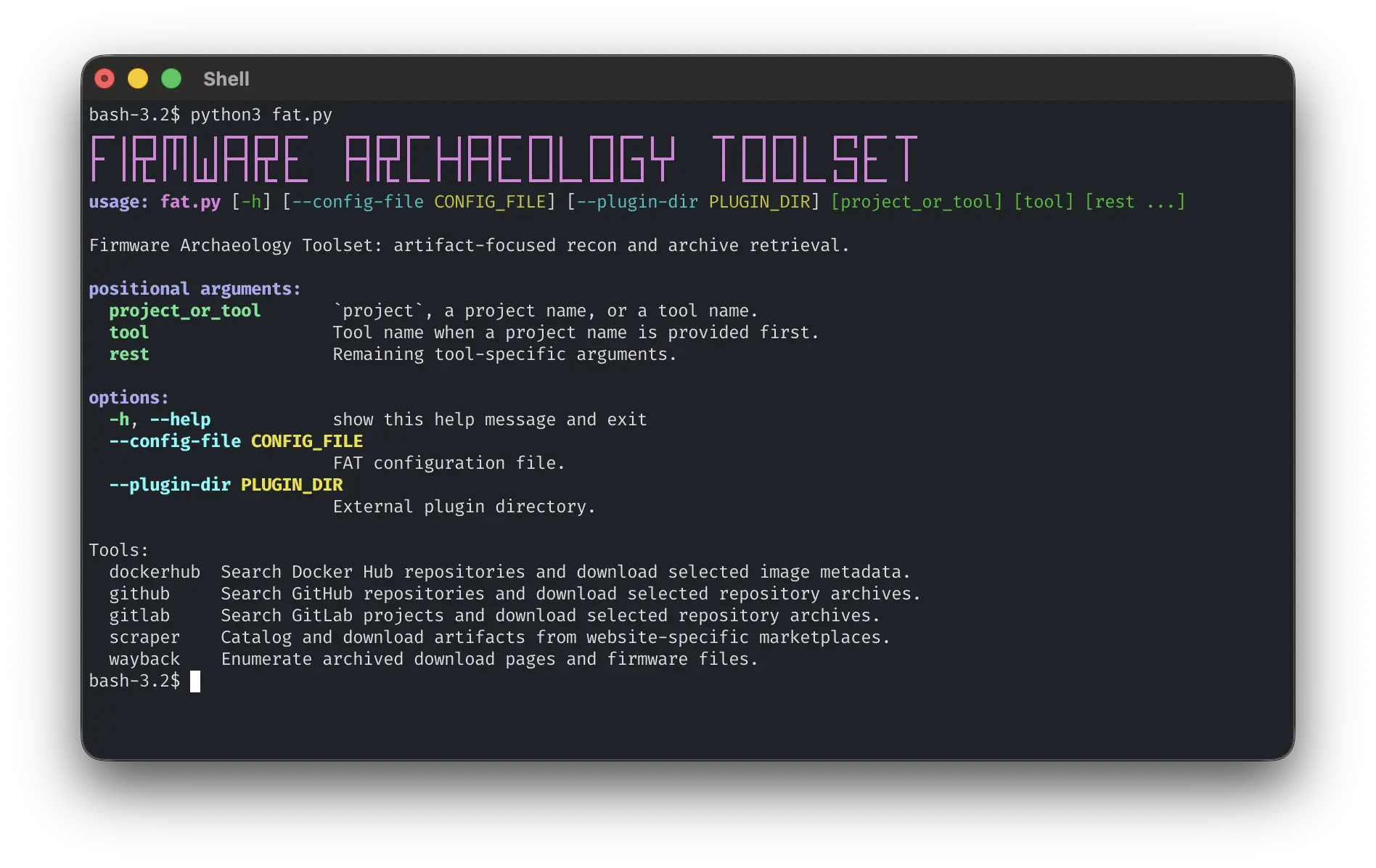
Once the specific keywords and URLs are configured, FAT searches those public sources for relevant candidates. Thanks to FAT, we reduced the search results to a much smaller subset, and eventually to one candidate container. This container was an old SDK environment and unfortunately did not contain any useful tools or secrets to deal with the device firmware images. However, it was useful for confirming product relationships and the general shape of the vendor's development environment.
The Bridge-firmware Hypothesis
While looking at other devices from the same vendor, we found earlier research describing an older firmware password scheme. We tentatively applied that scheme, with the necessary model-specific adjustments, to our newer target firmware. It failed. This failed attempt, however, brought us to a plausible hypothesis: the vendor may have used the same scheme on our model before changing the update format.
Fortunately for us, changing an encryption format creates a migration problem. Devices in the field still understand only the old update format, so the new decryption routine has to arrive inside a package encrypted with the legacy format. A bridge update can carry both sides of that transition: an image the old updater can process and a newer payload that introduces the next scheme.
To test that hypothesis, we searched historical update packages for two properties: a) the package can be decrypted with the legacy decryption routine; b) it contains more than one firmware image. As noted, the vendor's website exposed only the latest update, so we needed to dig into the Internet Archive to find the bridge update. The retrieval problem contains two separate parts:
- Enumerate captures of the relevant product or download page
- Resolve the links inside those captures and retrieve the archived files
FAT's Wayback plugin supports two complementary modes for solving this problem.
Exact URL Mode
When the product or download page is known, FAT can enumerate archived versions of that specific URL. This is especially useful when firmware download links are not predictable: instead of guessing the file URL, we recover snapshots of the page that originally contained it.
A vendor-specific parser is needed to extract firmware links from the archived product page. Conceptually, that parser can be as small as:
Domain Keyword Search
A vendor may restructure its website, change its URL scheme over time (as the vendor did during this research), or store the firmware on a different CDN. In those cases, FAT can perform a broader Wayback search across a vendor domain and filter results using keywords and file types.
In either mode, the tool returns a list of snapshots that can be selected and downloaded. If the selection is an HTML product page, the configured vendor parser is invoked; otherwise, direct firmware links are downloaded as-is.
Once the historical packages were available, we applied the old decryption path from the newest release backward. The newest release the legacy routine could open became the candidate bridge package. The Wayback parser can also expose a post_download hook that is invoked once a firmware file is available locally.
The hook is optional. FAT checks whether the selected parser exports a callable post_download function and invokes it after downloading the selected firmware. This post-download stage is where we integrated firmware decryption and classification.
The New Update Format: Reusing Vendor Implementations
By this point, we had learned a surprising amount without loading a binary into a decompiler. We had identified historical versions, recovered an old decryption path, and narrowed the search to a likely transition package. Inside this retrieved package, we found two encrypted firmware members: a bridge image using the old encryption scheme, and a target image using a newer one. We hoped it was the same scheme used by the latest update on the vendor's website.
So we started analyzing the bridge firmware, which revealed that the newer update format uses a layered process. The first layer was close to the older scheme, with a small change in the password derivation. After removing that layer , the resulting package contained another encrypted payload, together with a partially obfuscated decryptor binary. The next question was whether to reverse the obfuscated binary or emulate it.
Targeted Function Emulation
Targeted function emulation sits between running the full vendor binary and reimplementing the vendor's cryptography. The technique is based on the assumption that we can reconstruct a meaningful state for calling a single function or a subset of functions inside the whole binary. This is not always as easy as it seems. Locating the correct functions, providing them with the right context, and mocking the calls to unrelated ones might be more complex than the actual reverse engineering that we are trying to avoid. We also needed to consider that if a vendor is doing incremental updates, some of the runtime libraries needed for the binary to correctly load might not be included in the update package.
In our case, fortunately, the functions that handle the decryption of the firmware image have a small, easy-to-reproduce context, and all the runtime libraries needed were included in the bridge firmware image. We invoked the functions through a preload library. The binary performed the decryption operation itself, while our hook intercepted OS commands to avoid side effects on the analysis machine.
Many binary instrumentation frameworks can support this kind of work. We deliberately kept emulation outside FAT because FAT focuses on public-surface discovery, artifact retrieval, and the workflow that connects those steps.
For this target, a small C preload library was enough: keeping the mechanism small made both the control flow and the possible side effects easier to inspect. The following sketch illustrates that pattern with a small example data structure:
The address, calling convention, paths, fields and offsets in the real preload all come from reversing the target binary. The principle is straightforward: let the vendor code calculate the values it already knows how to derive.
One important point is to keep the emulation target as small as possible, avoiding side effects while still preserving the decision points used by the real binary. With this preload library, QEMU, and the required vendor libraries, we eventually decrypted the second firmware image inside the bridge update package and confirmed that this decryption routine also worked on the latest firmware update available on the vendor's website.
From Firmware to Applications
With the latest firmware finally accessible, we went after the rest of the attack surface: the platform's application installer and the third-party packages the device accepts. As we said at the beginning, those packages are encrypted too.
The installer decrypts accepted packages using a password derived from the package name rather than a single static secret. This might seem like a better strategy, but once the algorithm is known, the protection is gone. We had a strong hint about it before reversing anything: after a full factory reset of the device, renaming a previously working application package caused its reinstallation to fail. It took us a while to connect that failure to the package filename.
Using the same preload approach, we identified the correct function to invoke and supplied the expected context and application metadata. The first application decrypted successfully, but several others did not. That failure exposed a limitation in our first emulator. To reduce the risk of side effects from uninitialized objects in memory, we had emulated too little of the surrounding decryption routine. By looking again at the installer, we figured out that it actually supports two application formats: it tries the newer app encryption format first and, if that fails, falls back to an older format. Expanding the emulated wrapper, we preserved the control flow, leveraged the vendor code for the heavy lifting, and decrypted all the remaining applications.
Want to Give Away the Fun Part?
The Firmware Archaeology Toolset is a product of the LLM era, so here is the obvious question: can an LLM agent do this part of the work?
To explore that possibility, we are releasing skills that teach an LLM agent how to extend and use FAT. The goal is to eliminate the need for repeated web searches and ad hoc HTML parsers, establishing a data-collection format that is properly documented, and giving the agent an explicit workflow to follow. With these instructions, an agent can assist with building an integration for a new vendor and then use the resulting plugin to drive the retrieval workflow. Researchers can write the vendor integration themselves and keep direct control of the archaeology, or delegate that repetitive work to an agent and spend more time examining the artifacts it recovers.
Achievements and Next Steps
Recovering the firmware gave us the visibility needed to broaden the attack-surface analysis. We mapped services, configurations, IPC mechanisms and application behavior before deciding where deeper reverse engineering would be most valuable. That work eventually led to a 0-click RCE chain on the target. We also found a way to persist root access across reboots, firmware upgrades, and factory resets. The payload can only be removed by using a specific device feature, and doing so requires the victim to know how the device was targeted.
We are still working with the vendor to make the affected products secure, so we are not publishing the technical details of that chain here. Instead, we are releasing a tool that grew directly out of this research. FAT helped us turn scattered public artifacts into a working decryption routine for the latest available firmware image.
This article describes only one possible scenario in which FAT was used, but there is a lot more that the tool can do, and new plugins can be written to extend its capabilities. Wherever a vendor leaves traces in public sources, the firmware archaeology methodology applies, and we hope other researchers will find it useful against their own targets.